Service Contracts & Recurring Agreements
Turn ongoing work — HVAC tune-ups, lawn routes, cleaning maintenance — into a set-and-forget billing machine. One contract, recurring visits, drafts or full auto-charge.
The flow, end-to-end
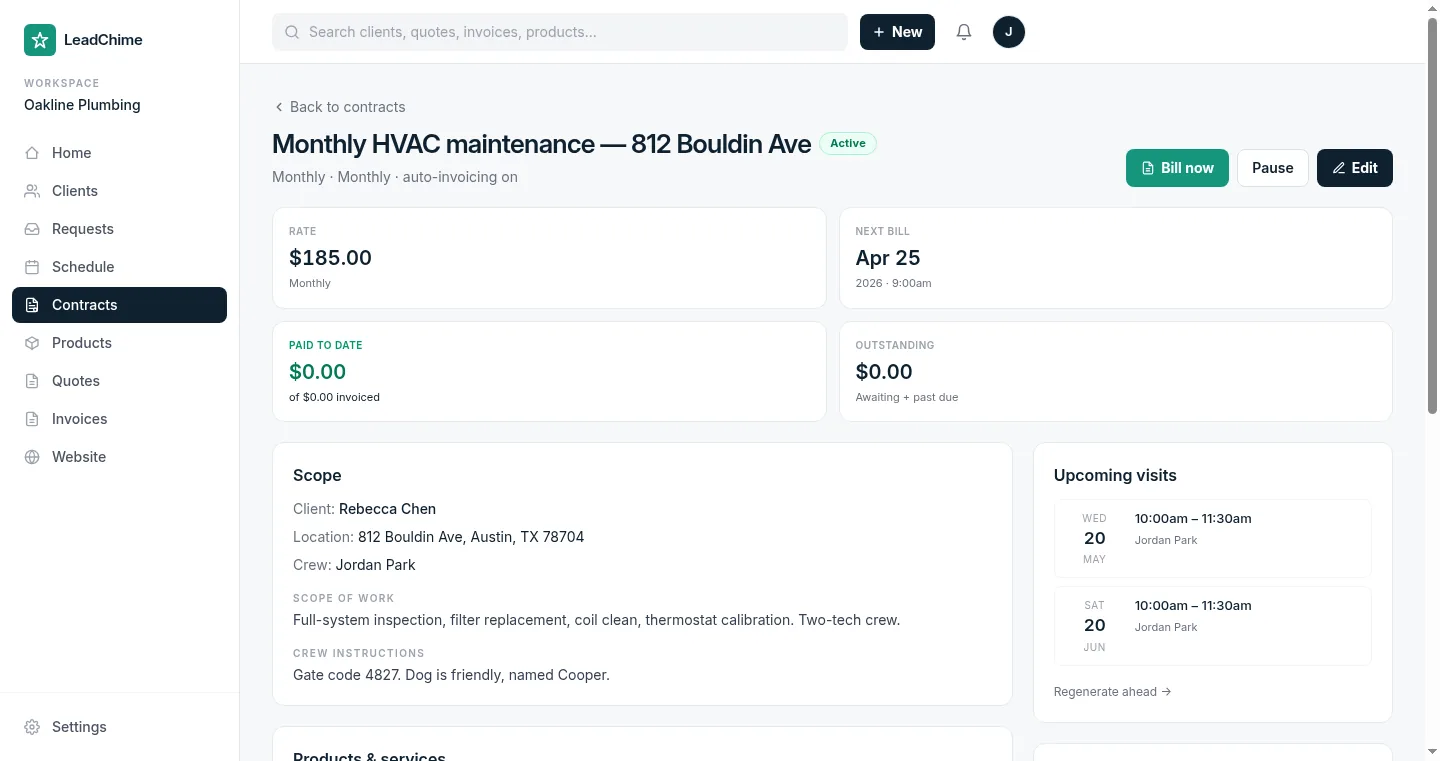
Here's what a monthly HVAC maintenance contract looks like from start to finish:
You build the contract
Scope, cadence (weekly / biweekly / monthly), start date, products & services. Optional terms & signature block.
The customer accepts
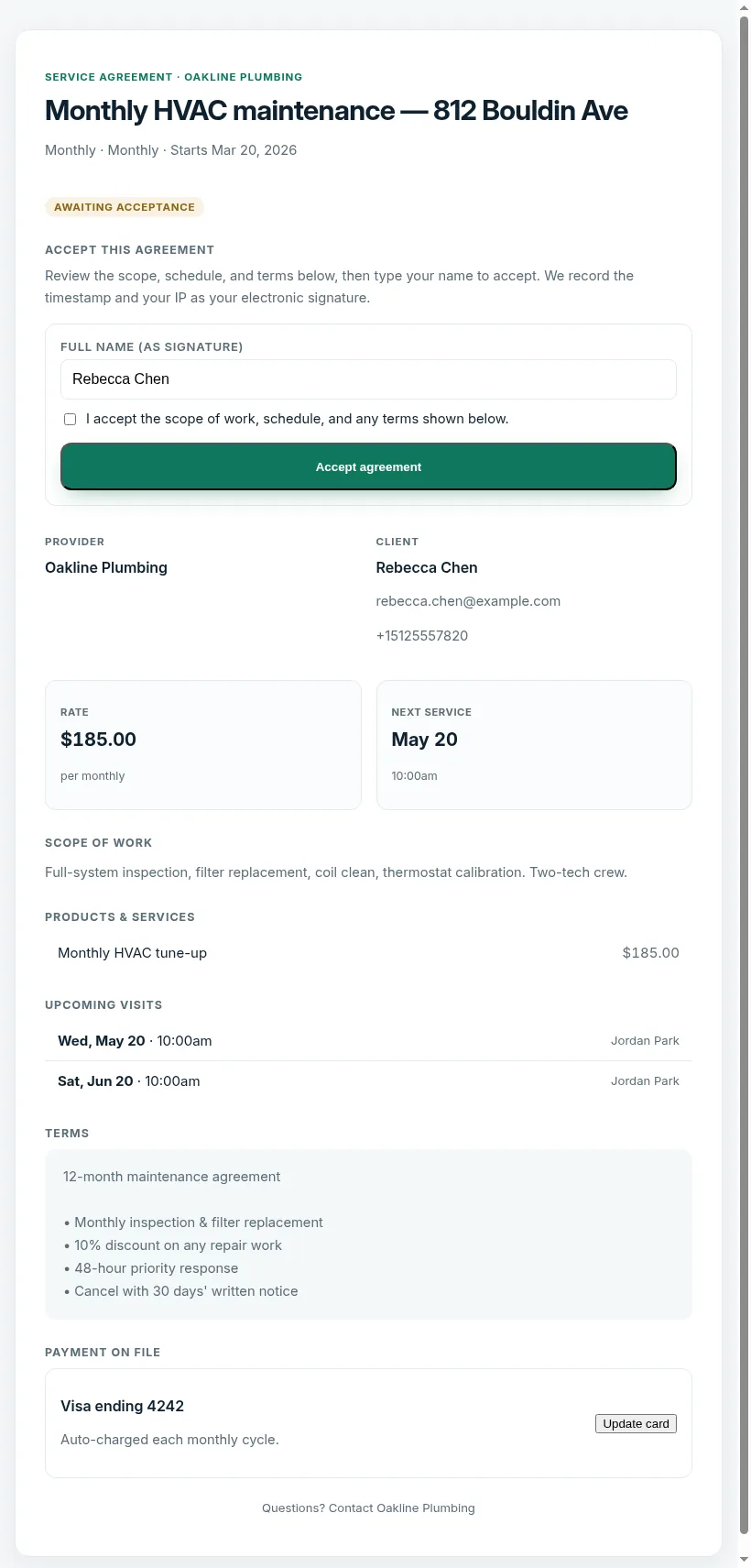
Share the client hub link (/contract/{token}). They review the scope, schedule, and terms, then tap Accept.
Visits auto-appear on your schedule
We generate visits 90 days ahead based on the cadence. Your crew sees them on the Schedule page and in the mobile app.
Invoices generate themselves
At each billing cycle, LeadChime creates a draft invoice with the products you defined. You review & send — or enable auto-charge for fully hands-off billing.
Auto-charge runs on the saved card
Once the customer has paid one invoice online, their card is securely saved. Future contract invoices charge themselves. If a charge fails, we retry automatically and notify you if it fully gives up.
Billing cadences
Pick how often you want LeadChime to bill the client. This is separate from visit cadence — you can visit weekly but bill monthly.
- Per visit — Invoice generates when the visit is marked complete. Good for ad-hoc variable-price work.
- Monthly — One invoice per month regardless of how many visits happened.
- Quarterly — One invoice every three months. Common for maintenance plans.
- Annually — One invoice per year. Best for annual maintenance agreements.
- Manual — No auto-billing. Use the "Bill now" button whenever you're ready.
Auto-invoice vs. auto-charge
Two toggles, two different levels of automation:
| Setting | What happens at each bill date |
|---|---|
| Auto-invoice OFF | Nothing. Use the "Bill now" button manually when you're ready. |
| Auto-invoice ON, Auto-charge OFF | A draft invoice is created automatically. You review, edit if needed, and send it to the customer. They pay online. |
| Auto-invoice ON, Auto-charge ON | A draft is created, then we attempt to charge the customer's saved card within the hour. On success, the invoice is marked paid and a receipt goes out. On failure, it flips to "awaiting" and your normal reminder flow kicks in. |
How cards get saved
There's no form for the customer to type a card into up front. Instead:
- The customer pays the first contract invoice via the usual secure checkout link (Stripe).
- During that payment, we ask Stripe to save the card for future use — Stripe discloses this to the customer on the checkout page.
- From then on, that card is the one we auto-charge.
You'll see "Visa ending 4242" on the contract's Payment method card once this happens. Before then, it shows "No card on file" and auto-charge is dormant even if the toggle is on.
What happens when a charge fails
Auto-charges can fail — insufficient funds, expired card, bank decline. Our retry policy:
- 1st failure — Retry in 24 hours.
- 2nd failure — Retry in 72 hours.
- 3rd failure — Give up. The invoice flips to "Awaiting payment" and the standard reminder flow emails the customer a pay-link. You get a text + email heads-up.
After a give-up, you can manually "Bill now" again, or ask the customer to update their card via the Update card button on their client-hub link.
The client-hub link
Every contract has a public URL like leadchime.com/contract/abc123.... It shows the customer:
- Scope of work + terms
- Upcoming visits for the next few months
- Latest invoice + pay-link (if any)
- Their saved payment method + a button to update it
Share this link by text or email when you send the agreement. The customer doesn't need to log in.
Tracking all your contracts
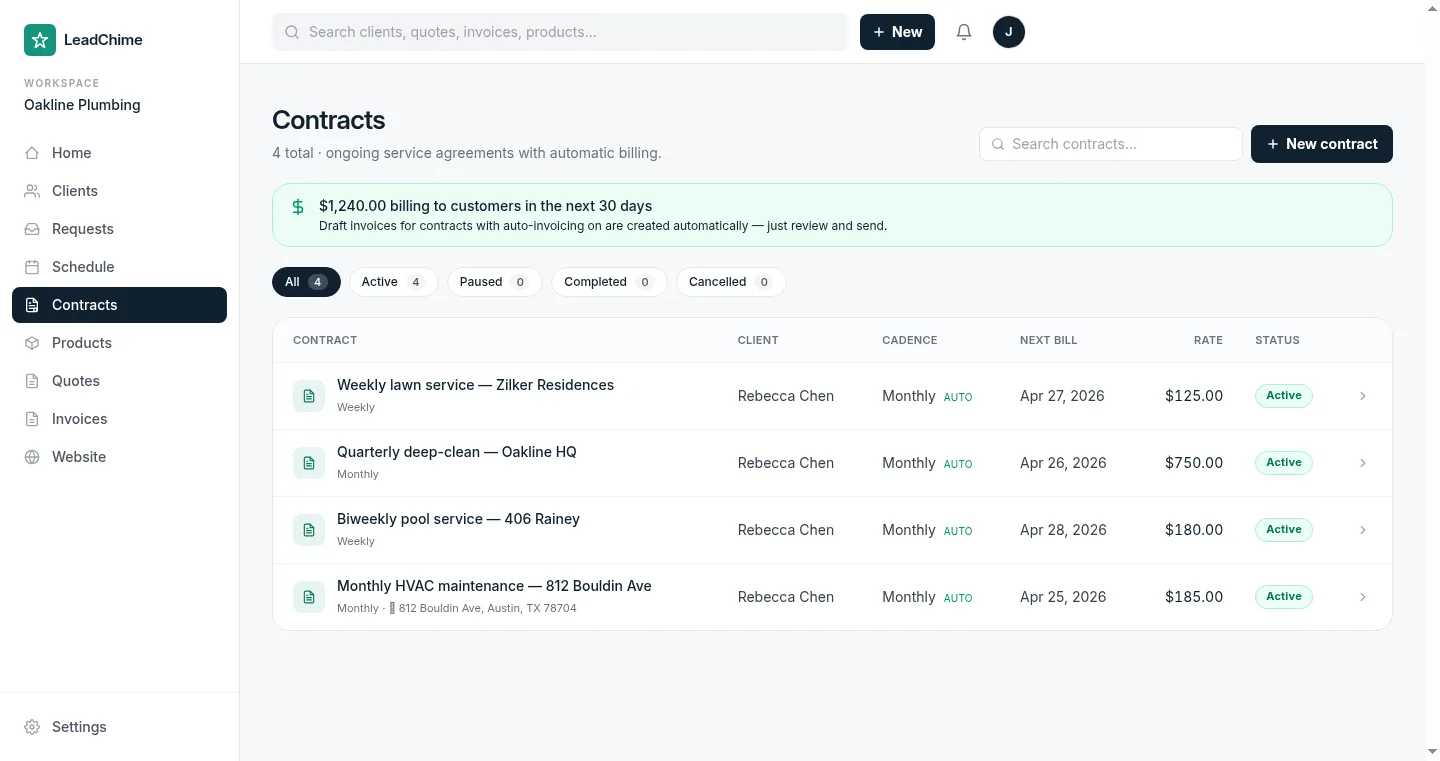
The Contracts index page lists every active, paused, and cancelled agreement with a running total of what's billing in the next 30 days. Use the status tabs to filter, or search by client or contract title.
Pause & cancel
Use Pause to temporarily suspend a contract — no future visits or invoices generate while paused. Resume picks back up from the next scheduled date. Customized visits (ones you've edited on the calendar) survive a pause.
Use Cancel to end the contract permanently. Past visits stay on the schedule for history; future non-customized visits are removed; past invoices stay on the customer's record.
Questions we hear often
Can I convert a one-off job into a contract?
Edit the job, change the cadence from "One-off" to anything else, and it becomes a contract — the billing fields appear automatically.
What if the customer signs mid-month?
The first visit fires on the start date you pick. The first invoice fires on the "Next bill date" you set — usually the start of their first full cycle.
Can one customer have multiple contracts?
Yes — each contract stands alone with its own schedule, rate, and billing. They all show on the customer's profile.
Does LeadChime support DocuSign?
Not yet. Today, the customer taps "Accept" on the client-hub link and we record their IP + timestamp as their signature. DocuSign integration is on the roadmap for formal legal agreements.
Need more? Message us and we'll walk you through it personally.
Ready to try it? Start sending branded quotes in under an hour.
Get Started